
Substitute coverage
without the 6am scramble.
FillMyClass is the simple way for teachers to request coverage — and for substitutes to claim jobs in seconds. No calling trees. No group texts. No guessing.
Your 6 AM shouldn't feel like a crisis.
Every school has lived this. One teacher calls out, and suddenly you're the operator of a phone bank — trying to fill classrooms before the first bell. FillMyClass turns that hour into a non-event.
The old way
- 5:47 AM 3rd grade teacher out. Start the phone tree.
- 6:02 AM “Sorry, I can’t today.” Four texts in a row.
- 6:18 AM Still three classrooms uncovered.
- 6:31 AM Are we combining classes again?
The new morning
- 5:47 AM Request posted to 42 qualified subs.
- 5:49 AM Ms. Rivera accepted
- 6:00 AM Every classroom covered. Coffee’s still hot.
Everything a busy school needs,
nothing it doesn't.
Smart request management
Teachers post coverage requests in seconds, with all the details a sub needs: grade, subject, and notes.
Real-time notifications
Subs get instant alerts for jobs via push, email, or text — whatever they prefer.
Preferred subs first
Teachers can invite preferred subs first, then open to the full pool if no one accepts within a set window.
Multi-school support
Run a single school or a whole district. Role-based access keeps every view appropriate.
Live admin dashboard
A bird’s-eye view of today’s coverage: who’s out, who’s accepted, what’s still open.
Frictionless onboarding
Invite teachers and subs via a join code or email. Sign in with Google, Apple, or email.
Three roles, one calmer morning.
FillMyClass is designed around the people who actually live this workflow every day — not a generic scheduling tool.
Total visibility before the first bell.
- Eliminate the morning phone tree
- See who’s out, who’s covered, what’s still open
- Manage multiple schools and staff roles in one place
- Invite subs and teachers with a join code or email
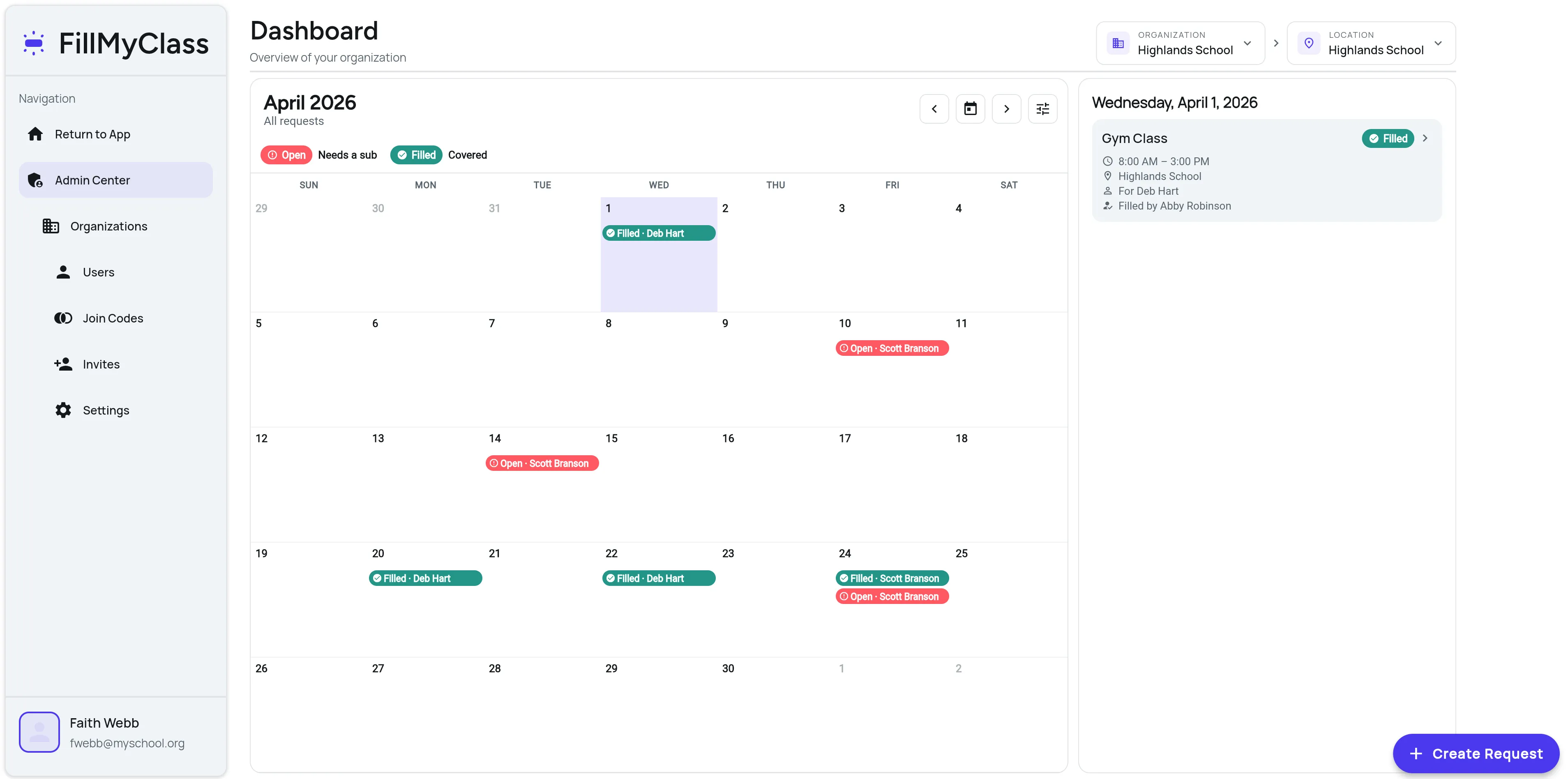
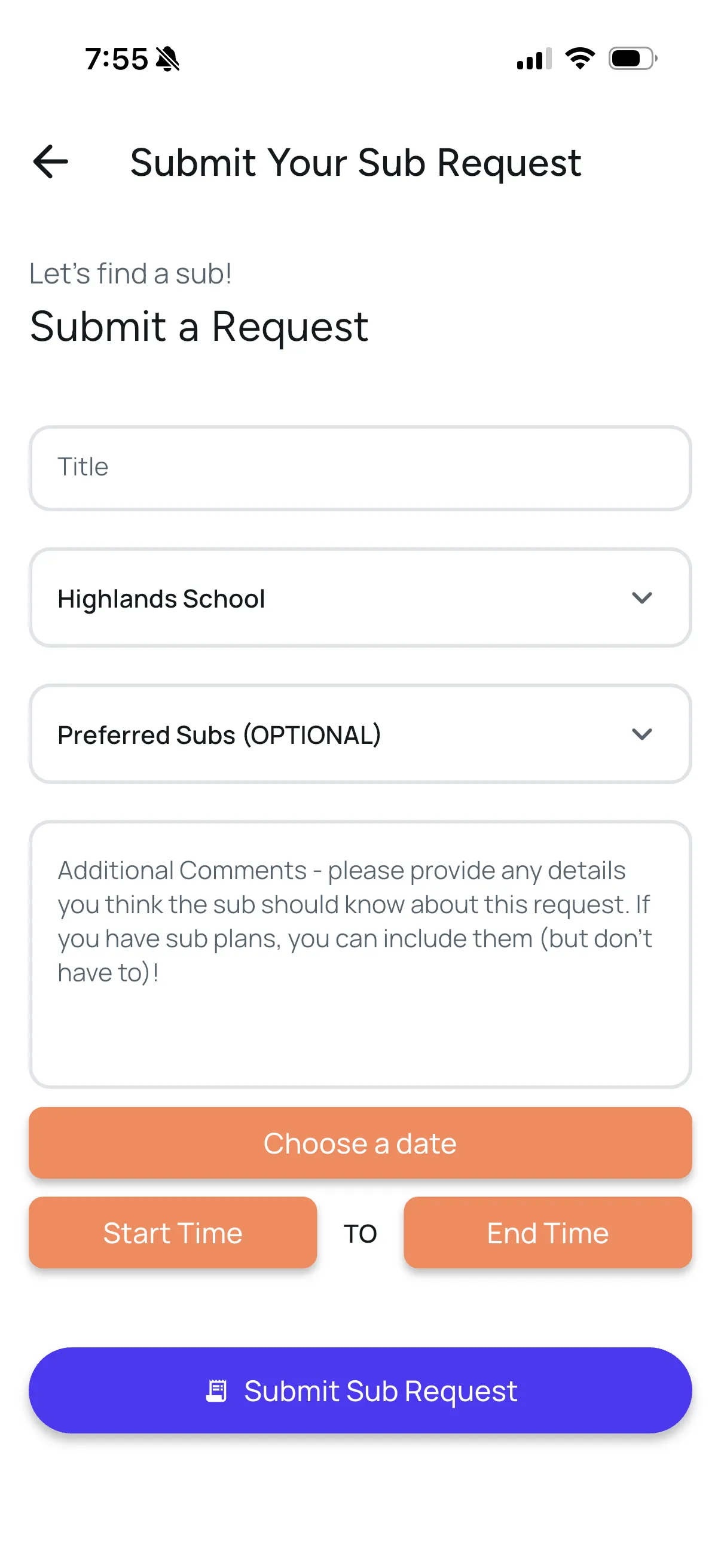
Peace of mind when life happens.
- Request coverage in under 30 seconds
- Invite your preferred subs first
- Get notified when a sub accepts
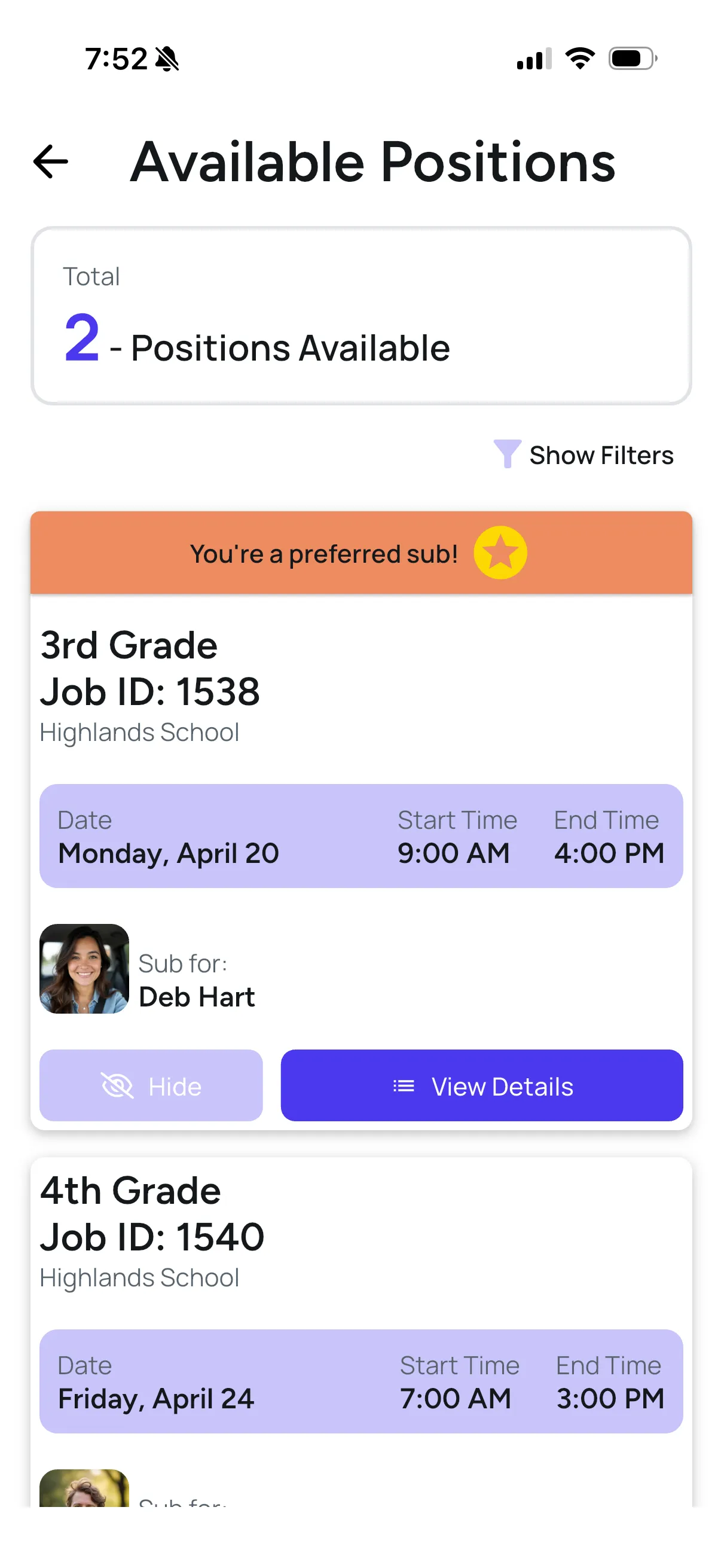
Never miss the jobs you want.
- Real-time alerts for jobs
- Accept in seconds — no phone tag
- See your upcoming jobs on the calendar
- Choose your notification channels
From “call-out” to “covered” in minutes.
Four steps. Most of them happen automatically while you're still pouring coffee.
Post the request
Enter the details in under 30 seconds. Add notes and choose preferred subs.
Qualified subs are notified
Matching substitutes receive instant alerts. Preferred subs see the job first, for a window set by the admin.
A sub accepts
The first qualified sub to accept is confirmed. Everyone is notified and the job is locked in.
Everyone is looped in
Confirmations go out, pre-job reminders are scheduled.
Built for the people who
keep school days covered.
As an administrator, I can quickly see who is absent and who the sub is for the day. FillMyClass has streamlined the process and taken so much stress out of finding substitutes.
Before my school had FillMyClass, getting a substitute was time-consuming and stressful. With the app, teachers are able to request coverage much more efficiently and with ease - just a few clicks in the app.
FillMyClass was a stress-free way to find a substitute. Whether I needed emergency coverage or was planning ahead, I could quickly enter what I needed and get notified when my request was filled.
It’s super easy to use as a teacher and also as a sub.
Simple annual pricing based on school size
Every school gets the core FillMyClass workflow. Pricing is based on the number of teacher/admin users and whether your organization has one school or multiple locations. Substitute accounts are included at no additional cost.
Small School
Single campus · roughly 20–40 teacher/admin users
Best for smaller schools managing substitute coverage with a focused team.
Request small school pricingMedium School
Single campus · roughly 40–75 teacher/admin users
Best for larger schools with more staff and more coverage needs.
Get medium school pricingLarge / Multi-Site
75+ users · multiple campuses or networks
Best for school networks, districts, larger schools, and multi-campus organizations.
Talk with us90-day fit guarantee
We want FillMyClass to be a good fit for your school. If your school starts using FillMyClass and decides within the first 90 days that it isn't the right fit, we'll refund your subscription.
Founding-school pricing
A limited number of early partner schools may qualify for reduced first-year pricing as they help shape the future of FillMyClass.
What devices does FillMyClass support?
Does FillMyClass provide the substitutes?
How does “preferred subs” work?
Can we run multiple schools in one account?
How do subs get notified?
How do we invite our teachers and substitutes?
What does onboarding look like?
What makes FillMyClass different from other solutions?
Not ready to book
a demo?
Send a quick message and we'll help answer questions about pricing, onboarding, or whether FillMyClass is a fit for your school.
- Ask about pricing or school size
- Talk through setup and onboarding
- See whether FillMyClass fits your current sub process